Showing posts with label Linux Mint. Show all posts

Monday, April 14, 2014

Installing Programs in Linux

Yep! All Tech this time. Well, almost all Tech. Maybe some Cats and Food later!

Ont of the worrying things about starting using a new OS is how to add programs. In Linux this ends up as being both transparent and easy. The transparent part can be a little frightening at first, but the easy part should get your confidence up!

Installing Programs in Linux  --  Firebird

As you probably know, while I use Windows at work, I use Linux almost exclusively at home. So, to encourage all you users of Windows XP out there who might be wondering about what to move to not that Microsoft has finally given up on supporting you, I've decided to write a few Help articles to show how easy some things can be in Linux.

This little article is an introduction on how one goes about adding programs to a Linux system. You'd think that big programs would be more difficult than small ones, but really the following is the same for almost any program in Linux. The programmers add the program (including a list of everything it needs in order to work) to a Package Repository, and the Package Manager on your computer goes there to find the software you're asking for, download it, and install it. In this example I'm going to install FireBird, a database server, so not a particularly trivial piece of software!

Once upon a time there was a little company in Groton, CT (yes! - where they build the submarines) that created a database engine (the program that handles the data) called InterBase. There's a good article on Wikipedia here that explains the history and gives a good explanation of the way InterBase handles Concurrency (when two users want to change the same piece of data at the same time).
In the 1980s they sold out to Ashton-Tate (of dBase fame) who were bought by Borland in 1991, really for just one reason - InterBase. Borland already had Paradox, a desktop database that was superior to both dBase and Access. Since then InterBase has been both open-sourced and developed (by Embarcadero), and the open-source version is called FireBird. Interbase runs on Solaris systems as well as Windows, is a really nice database with an amazingly small footprint (it'll run from 500 KB on disk! When was the last time you saw anything measured in kilobytes??!).

So let's get to it!
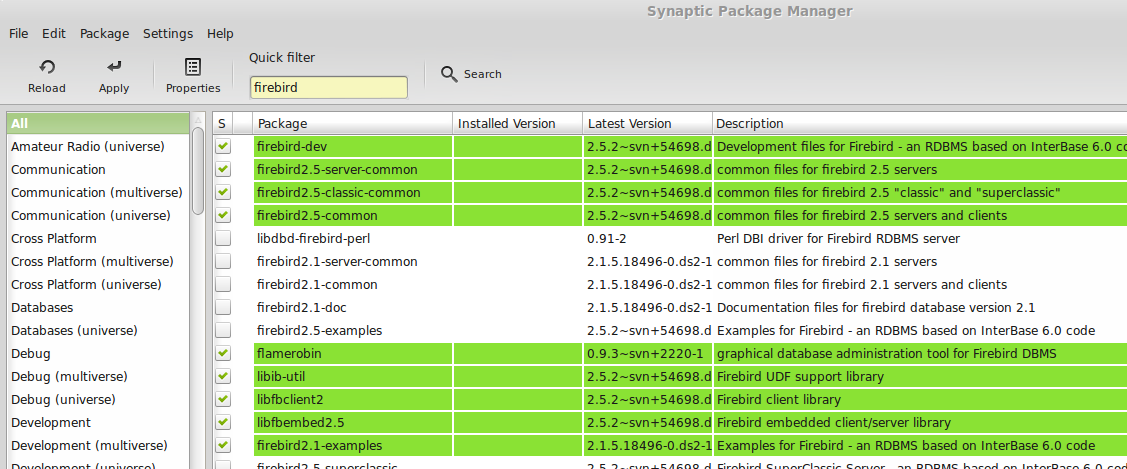
Here I am running Synaptic Package Manager to install the database.

What happens is that I click on the check-box beside the name of the program I want to install. For each selection I have to confirm my choice and the program checks it off, along with any other pieces that it needs but that I don't yet have. At the end I can click on the Apply button at the top of the program window and all will be installed.

At the end of it all I even get a nice reassuring status message:

That's nice, of course, but where's the program? Well, the first item in the second block of green in the first screen-grab is FlameRobin, which is the GUI interface for FireBird, so I can go to the menu system and look for it.I'm using Linux Mint, so the menu system looks like this and if I select Programming from the list of categories I see FlameRobin here. I can click on it to start it.


After starting FlameRobin, telling it where to find the database that FireBird is managing, and giving it all the right names and passwords, here I am!


So, you can see that installing even quite a complicated program into a Linux computer is not that frightening after all. The neat thing about a Linux program is that you get it from a package manager. Your system tells the package manager what release you're running, and the package manager tells your system what other pieces of software it'll need to have in order to run the piece you are asking for.

There are, of course, times when you just can't run a piece of software, usually because your OS version is too old. In that case you are told as much, and you update. Updating is, surprisingly, more like installing a Windows service pack than moving from Windows XP to Vista, for example!

So, let's imagine that you're leaving Windows XP for the wilds of Linux. First, go down to your local Barnes & Noble and get a Linux magazine with a  DVD in it / on it. On that DVD will be a number of "Distributions" of Linux - the basic beast with various bundles of goodies to make it easier to use. Alternatively, go to one of the sites I mention below, download a "live" disc image ("live" means one that you can boot and run, not just install from) of the product.

Put that in your DVD drive and boot your machine: you should be able to select to boot from the DVD (if not there'll be a setting in your PC's BIOS to let you) and you'll get a menu offering you a list of the various distributions on the DVD. Select one and your computer will boot into that distribution - it may be Ubuntu, or Mint, or even Zorin (which can be made into a very XP-looking system indeed). The system will be somewhat slow, as you can imagine, as it'll be reading from the DVD every time it wants to do anything, but you'll be able to see two important things:

  • Does it work with your hardware? Does it work with your wi-fi, with your printer and scanner, and other things you may have attached.
  • Do you like the way it looks?
  • Now you can add the programs that will do what you want to get done, leaving Windows behind!
TTFN

Monday, April 07, 2014

XP is an Orphan - What Next?

Windows XP was released to manufacturing on August 25, 2001. It replaced Windows 2000 (right) in the line of "new technology" products (that had started with Windows NT 3.5), and Windows ME in the line of consumer products stemming from Windows 95.

Windows XP was Microsoft's effort to bring the undoubted benefits of the NT operating system to the customers who were using a Windows shell sitting on a DOS base, very similar in many ways to the way in which Windows 3 had been a program running on DOS 6.

Finally, twelve years and seven months later, after three separate offerings of replacement operating systems, Microsoft is calling it a day and saying "enough!" for Windows XP.

But "why?", you may ask. "It works very well! Why change what isn't broken?".

Well, aside from Microsoft needing to earn money to pay its programming staff (sorry for the burst of cynicism there!), it has become apparent over these last twelve years that things could have been done better in Windows XP. Believe it or not, Vista (January 2007) really was a better OS, despite being vilified like few other products in history! Vista's problem was really that it needed more powerful machines than were running Windows XP machines at the time, so people had a bad experience and returned to XP.

Aside from that, here's the reply I recently made to someone who asked why they should move on from Windows XP:

All non-trivial systems have flaws. Mostly the systems operate fine and the flaws go unnoticed. An example is a steam engine with a pressure guage linked to a pressure-release valve. While you have a careful operator the pressure never rises too high, so a blocked valve is no issue. However, if a new, inexperienced operator is introduced then the pressure may rise, not be relieved by the valve, rise further, and lead to a violent release of pressure in unplanned ways (aka an explosion!). 

Likewise, operating systems all have flaws - some do a better job of hiding them than others. Windows has far more users than the other operating systems, so more opportunities for careless or malicious users. 

With Windows, Windows XP is simply one member of an ongoing family of products, starting with Windows NT 3.51 and currently offered in Windows 8.1. The large majority of the code in one version (Windows XP, for instance) is also present in the next (Windows Vista). This means that if a problem is found in Vista (or 7, or 8, or 8.1) then the chances are high that it was also present in Windows XP (and 2000, and probably NT 4, and possibly NT 3.51). 

With millions of Windows XP users still out there as targets, any problems that Microsoft fixes with Vista, 7, 8, etc. will immediately become pointers that malware writers will use to locate the same problems (if they exist) in Windows XP. If the part of, say Windows 7, with a problem is new since XP then an XP user is ok. If on the other hand, the code was there in Windows XP too then the malware writer has just been told (by Microsoft!) what the flaw is, where it is, and how to exploit it! 

That is the problem with staying with Windows XP. 

My suggestions: 
    If you want to stay with Windows then go to Windows 7 
    Else move to Linux Mint. 

If you really need to stay on Windows XP, try to move to Mint and run your XP in a virtual machine that doesn't access the internet. You can easily achieve this using Oracle's VirtualBox by turning off internet access in VirtualBox (so that XP has no way of turning it back on!) and by allowing the contained XP system access to a small part of one of the host system's disc drives. 

Now lets look at what's on offer as systems to move to.

Windows 7
Windows 7 was released in July 2009 and, aside from doing away with some features that geeks like me use but which the general user-base of Windows XP does not, is definitely an improvement over Vista and a huge improvement over Windows XP.

To the right you see an example of how you can hover over a task bar icon and see live thumbnails of the instances of the program that are running, so you can select between them.
Above is the Windows 7 taskbar, with the rather nice feature of being able to pin often-used tasks to it for easy re-use. It's always been possible to get into the menu system and reorganise it, but this feature alone takes away much of the need for messing with the menus.

Windows 7, for my money, is definitely a far better system than Vista and, if you're going to move from Windows XP but stay with Microsoft, is the place to go to. Extended support for Windows 7 is expected to end in 2020, so you should be ok for a while there!

Windows 8
Then there's Windows 8. Good for phones and tablets. Somewhat of a pain for desktops.

Apple
You could move to an Apple operating system, but you would have to jettison your computer and search out all new programs for everything you do.

Linux
Linux is a kind of a half-way house between staying with Windows, moving to 7 from XP and departing the Windows fold completely and buying a Mac and all new programs. Yes, it's a very different operating system, but it has lots of features that make it an easy move from Windows XP. You don't jettison your computer but you do look for new programs (well, a lot of them).

One thing you should realise when you start looking at Linux is that while it's very different under the hood, there's so much variety that it can be made to behave in a way that's comfortable for you. Rather like moving from a petrol-fueled car - you can go to diesel (Audi, Mercedes, VW, for example), or electric (Nissan, Tesla), or hybrid (Toyota, Ford, Nissan, ...) - so you can almost certainly find a car that'll suit you! Similarly to there being lots of car makers, there are lots of different Linux Distributions ("Distros"). Most can be personalised to a great extent.

Let's take a look at an average user; here are some problems that people think that they have:
  1. Hardware. If you're using an older XP system or a net-book (here or here) then Windows 7 or Windows 8 may simply be too demanding for your computer. There are several varieties of Linux, OTOH, that are specifically designed for smaller, older machines. For an example, look at Puppy Linux.
  2. My machine is quite old, but I really like the Windows XP interface. Try looking at Zorin (which is a Linux that can be made into a very XP-looking system indeed)
  3. My machine is new, but I really need Windows XP for some programs that aren't being upgraded. Here you could go to Windows 7 Professional, which has an XP Emulation package, or, if you have a nice powerful machine, like the one I'm writing this on, you can get a free program from Oracle called VirtualBox and run a copy of Windows XP, along with your programs, inside it. I'd really recommend that you try to get a replacement for your program, though, as replacing old software tends to get more expensive the longer you leave it!
  4. I really need iTunes. Well, that one really is a showstopper for Linux - there isn't a version of iTunes for Linux. Don't forget, though, that you can download directly to your device from iTunes online.
  5. I'm always on the web. There are lots of browsers for Linux - Firefox, Chrome, and Konqueror are just three that spring to mind. Personally I use Chrome on Windows, Linux, and ChromeBook systems and they're all constantly synched.
  6. How do I know if I'll like it? With Windows you look over someone else's shoulder. With Linux there aren't so many users, so you can get what's called a "Live Image" - either on a DVD from a magazine or by burning one downloaded from a Linux distro site. Then you can boot your PC from the CD or DVD and get a Linux instead of Windows. It'll be slow, because it'll be forever reading the disc, but you'll be able to see if it works on your machine and if you like it. 
  7. I have software that runs on Windows XP that I must have, but that doesn't run on Windows 7 or Apple or Linux!!  This seems like a real problem, but it can easily be surmounted, as I mentioned in the answer I gave elsewhere (in the box above) by moving from Windows XP but not moving from Windows XP! :
  • move your system to any of the three major options (Windows 7, Apple, or Linux), 
  • install a virtual machine on your new OS (VMWare, Parallels, or VirtualBOX, respectively, are all good choices), 
  • create a new Virtual Machine, 
  • install your Windows XP system into your Virtual Machine, 
  • disable the internet 
  • enable a shared drive between Windows XP and your host system, 
  • install your programs, 
  • go on with your life.
Next time: Creating a new Virtual Machine (for Windows XP, in Linux).

Resources
For those still cautious about the idea of moving from Windows, you can read about my first essays into living in the land of Linux here.
For programs in Mint to replace your Windows program, try looking here.
Ziff-Davis have prepared what amounts to a super-sized version of this blog post here.
TTFN

Found Food

I have published quite a few recipes here on my blog over the last few years, and I hope that all my readers have tried at least some of the...